
Hosting is the joy of a full table, and the puzzle of who eats what. “We're hosting!” is the Popotam feature that plans the menu for a meal with guests, free and with no account: you say who's coming, with their allergies, diet and dislikes, and Popotam suggests a menu for the whole table, shows you everyone's plate, and adds the meal to your planner with its groceries.
Say who's coming, Popotam plans the menu. Free, no account.
- Everyone's allergies
- A variant for the veggies
- The groceries and when to start each dish
What to cook when you have guests?
A good guest menu starts with two questions: what you feel like serving, and what everyone can eat. The rest follows: one generous dish to share for a laid-back evening, starter-main-dessert for a proper meal, nibbles to graze on, a weekend brunch, a festive meal for big occasions.
What makes it tricky is when constraints pile up: a vegetarian friend, a friend allergic to tree nuts, a kid who picks out the vegetables. You end up cooking three meals, or serving plain pasta to everyone. That's exactly the part Popotam takes care of: it plans a menu where everyone gets a real plate, and tells you which one.
What “We're hosting!” does
- Any date, up to a year ahead, lunch or dinner, even in a week you haven't planned yet.
- Five formats: one dish, starter-main-dessert, dinner party nibbles, brunch or a festive meal.
- Up to 24 people, adults and children (a child counts as half a serving), with or without your household at the table.
- Everyone's constraints: their diet, their allergies (the 14 major allergens of EU law, plus any you type in) and their dislikes.
- One menu for everyone, a variant or two dishes, whatever suits you.
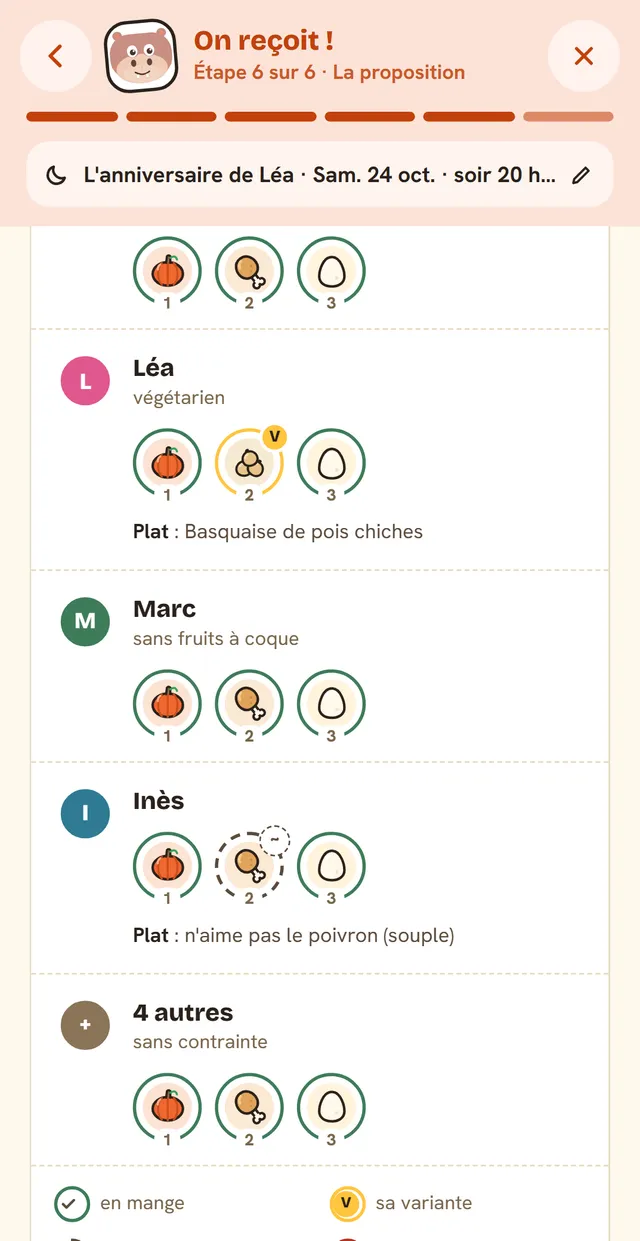
- “Who eats what”: one row per guest, one plate per course.
- The meal's groceries in your list, and when to start each dish, with what to make the day before.
- The menu to print or share with no names on it, and a sheet just for you with what to watch out for.
- Your saved tables, to host the same people without starting over or serving them the same dish twice.
Your guest menu in six steps
It all starts from your planner: tap “Host guests” at the top of the home screen, or “Host at this meal” in the menu of a dish you already planned.
1. The date and what you're serving
A month calendar shows the days already planned, the ones that aren't yet, and the ones where you're already hosting. You pick lunch or dinner, the format, and if you like, a time to sit down and a name for the occasion (“Léa's birthday”).
2. How many of you there'll be
Adults and children, then your household: at the table, it counts in the servings and Popotam respects its diet and what it doesn't eat, just like in your weeks; not at the table, only your guests count, handy when you're cooking for others. If a dish was already planned for that slot, you choose: keep it for more people (quantities and groceries follow, and you're done), or swap it for a guest menu.
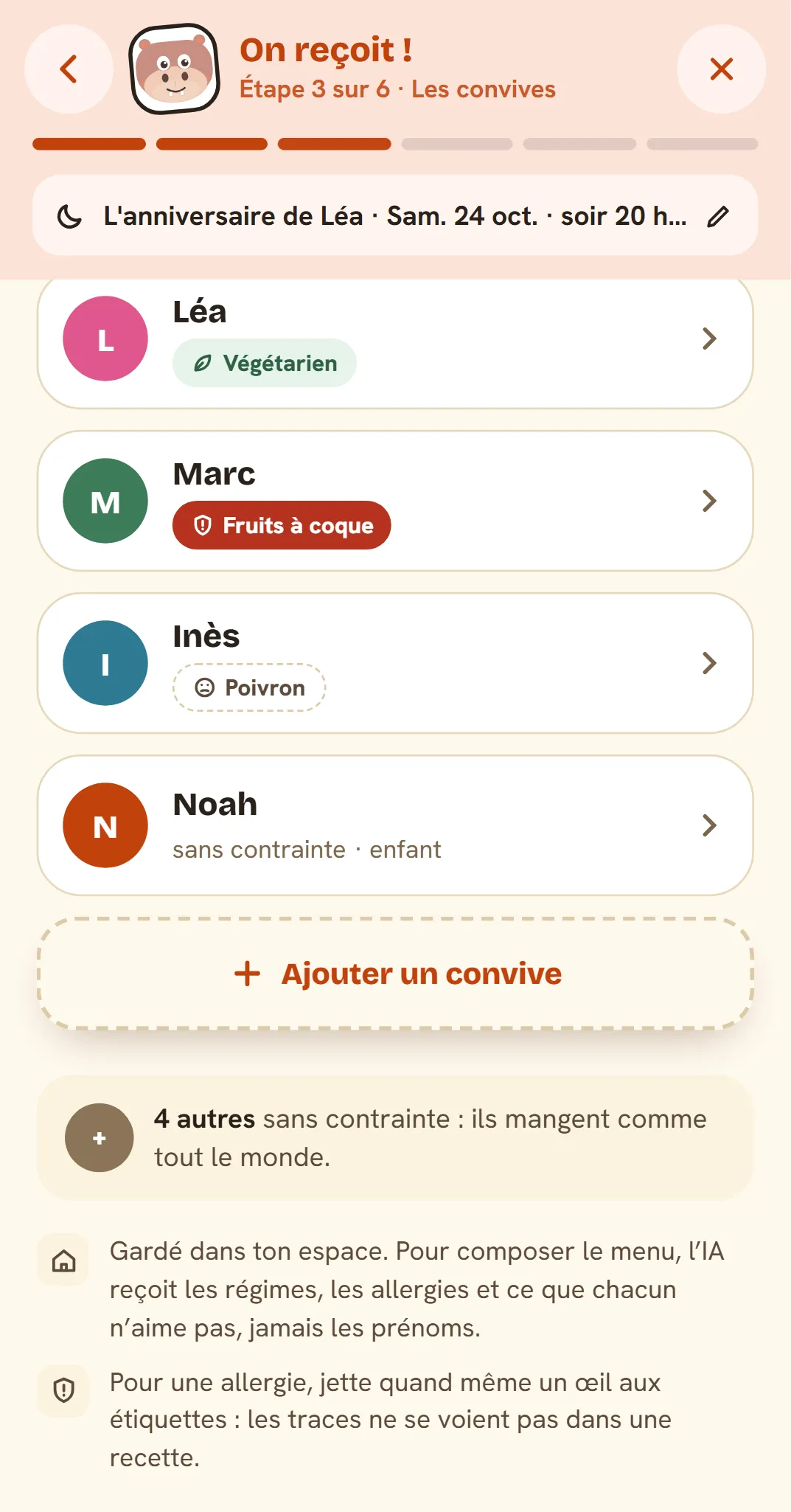
3. The guests with constraints
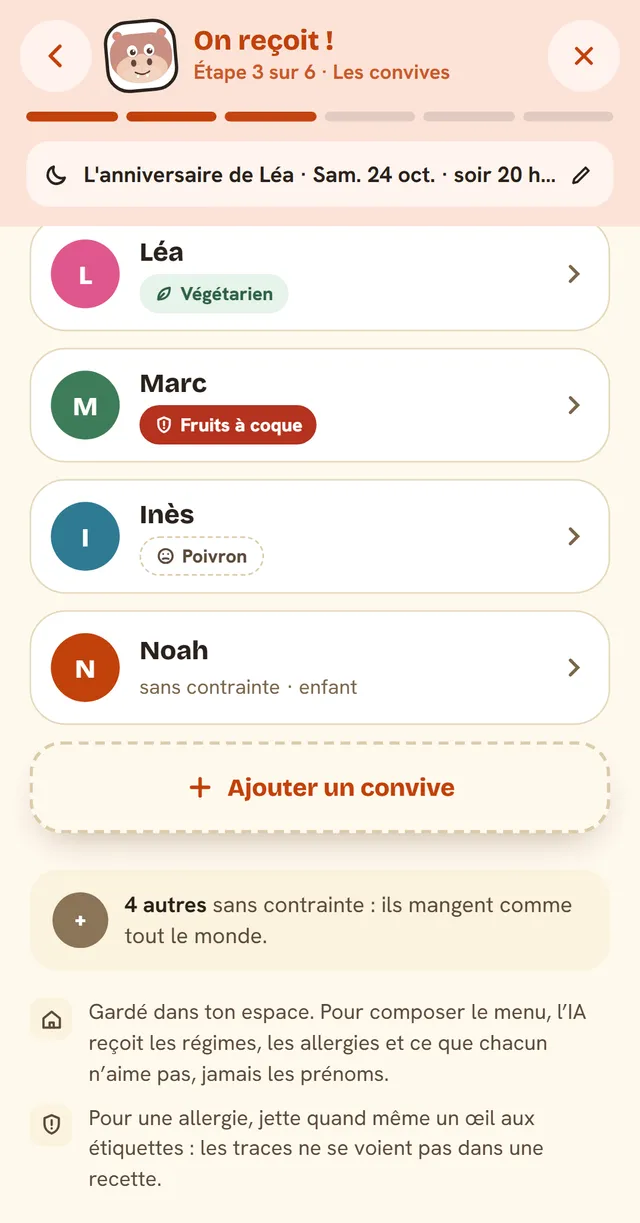
You only describe the guests who have some: the others eat everything, and Popotam gets it. For each one, a first name or nickname if you like, their diet (vegetarian, vegan, gluten-free, lactose-free, halal, pork-free, pescatarian), what they're allergic to, and what they dislike.
4. One menu for everyone, or a variant?
Popotam tells you what it understood (“1 vegetarian, 1 tree nut allergy”) and you choose: one menu for everyone, where everyone eats the same thing; a variant for those who can't, the same base with a different finish, never a second full meal; or two dishes, another main dish designed for those with a different diet.
5. Budget, time and skill level
A budget per person or for the whole table, how long you want to spend cooking (30 minutes, one hour, two hours, or all the time you need) and your level (easy, medium, or “I'm going for it”). They come from your preferences, and you change them for this meal only.
6. The suggestion
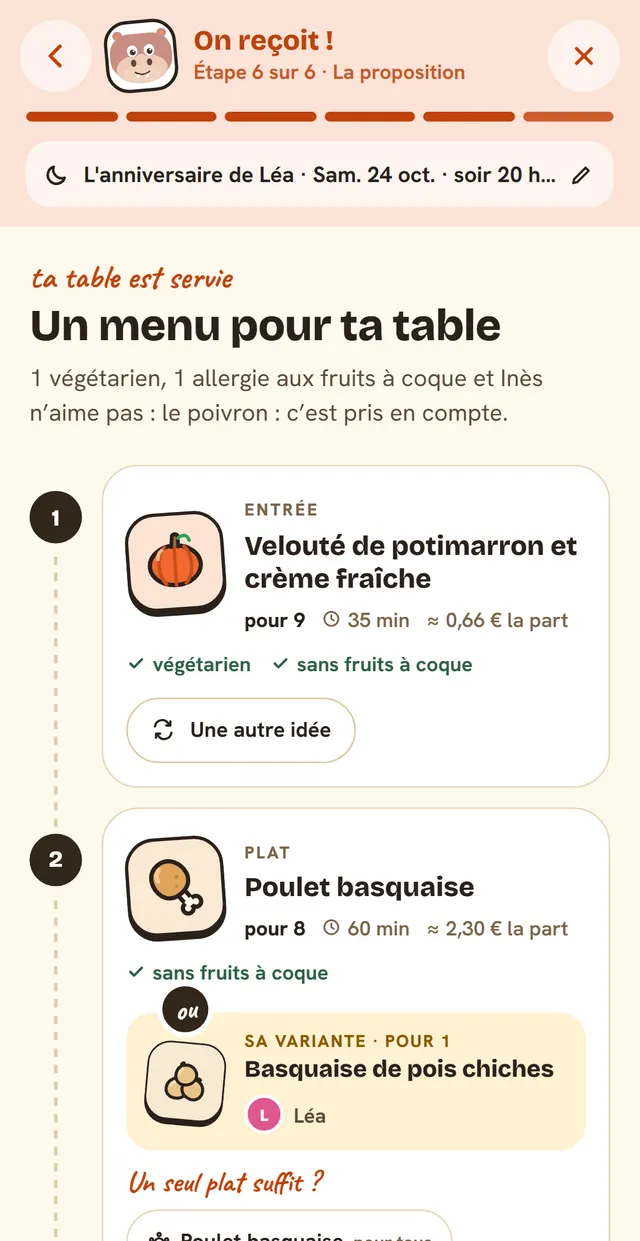
Popotam goes around the table and suggests a numbered menu, course by course, with each dish's servings, time, price per serving and what it's designed for (“tree-nut-free”, “vegetarian”). The variant sits right under the dish it replaces, with the names of those who'll eat it.
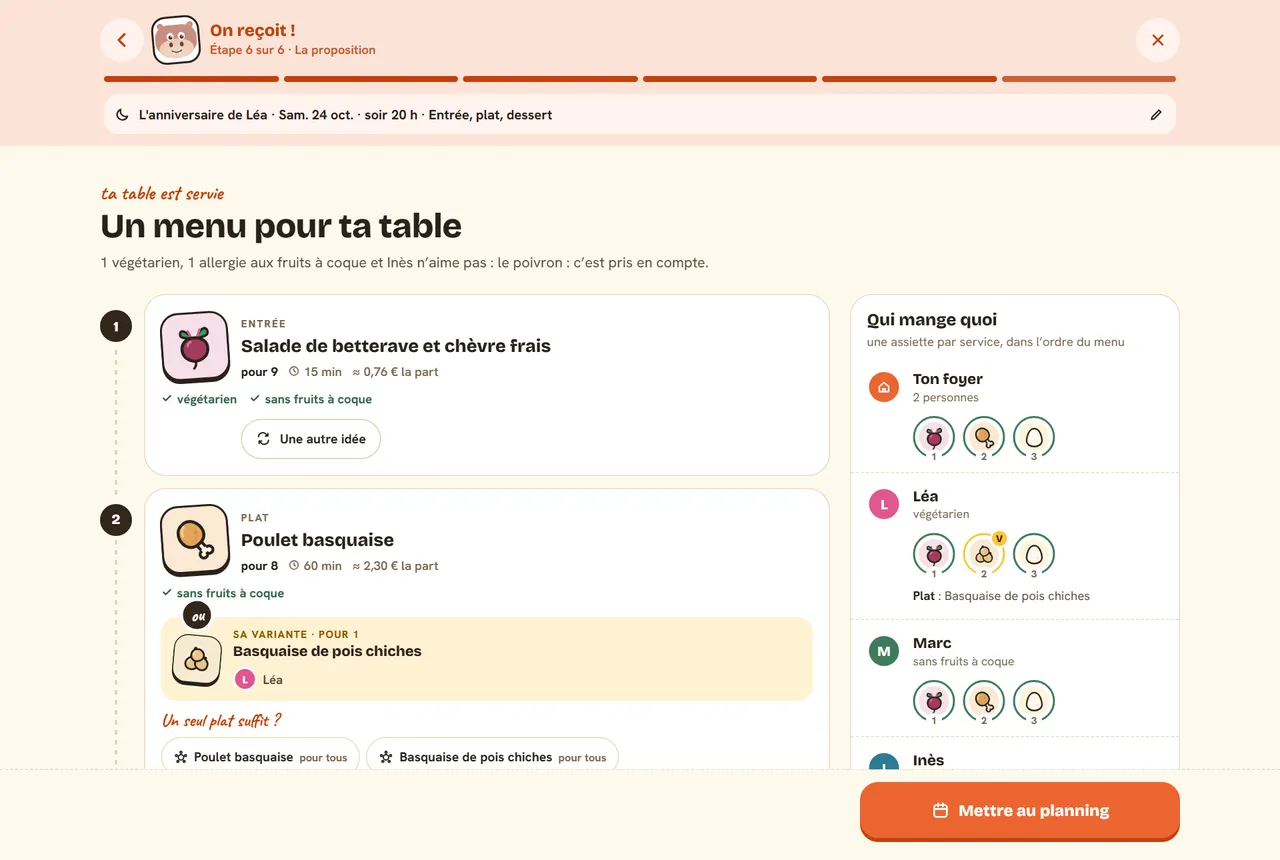
Tap “Add to the meal plan”, and the meal takes its place in your week, with its groceries.
Allergies, vegetarians, halal: everyone eats with peace of mind
Popotam doesn't treat every constraint the same way, and that's on purpose:
- Allergies and health needs apply to the whole table. Gluten-free, lactose-free, milk, peanut, tree nut or sesame allergies, and the rest: one kitchen, one cutting board, dishes passed from hand to hand. A dish “for the others” that contains peanuts isn't safe for the allergic guest sitting next to it.
- Vegetarian, vegan, meat-free: a close variant. Basque-style chicken for the table, Basque-style chickpeas for Léa: same base, same sauce, only the problem ingredient changes, and the groceries stay almost the same.
- Halal, pork-free, fish-free apply to the whole table with “One menu for everyone”; with a variant or two dishes, the guests who need it get their own version.
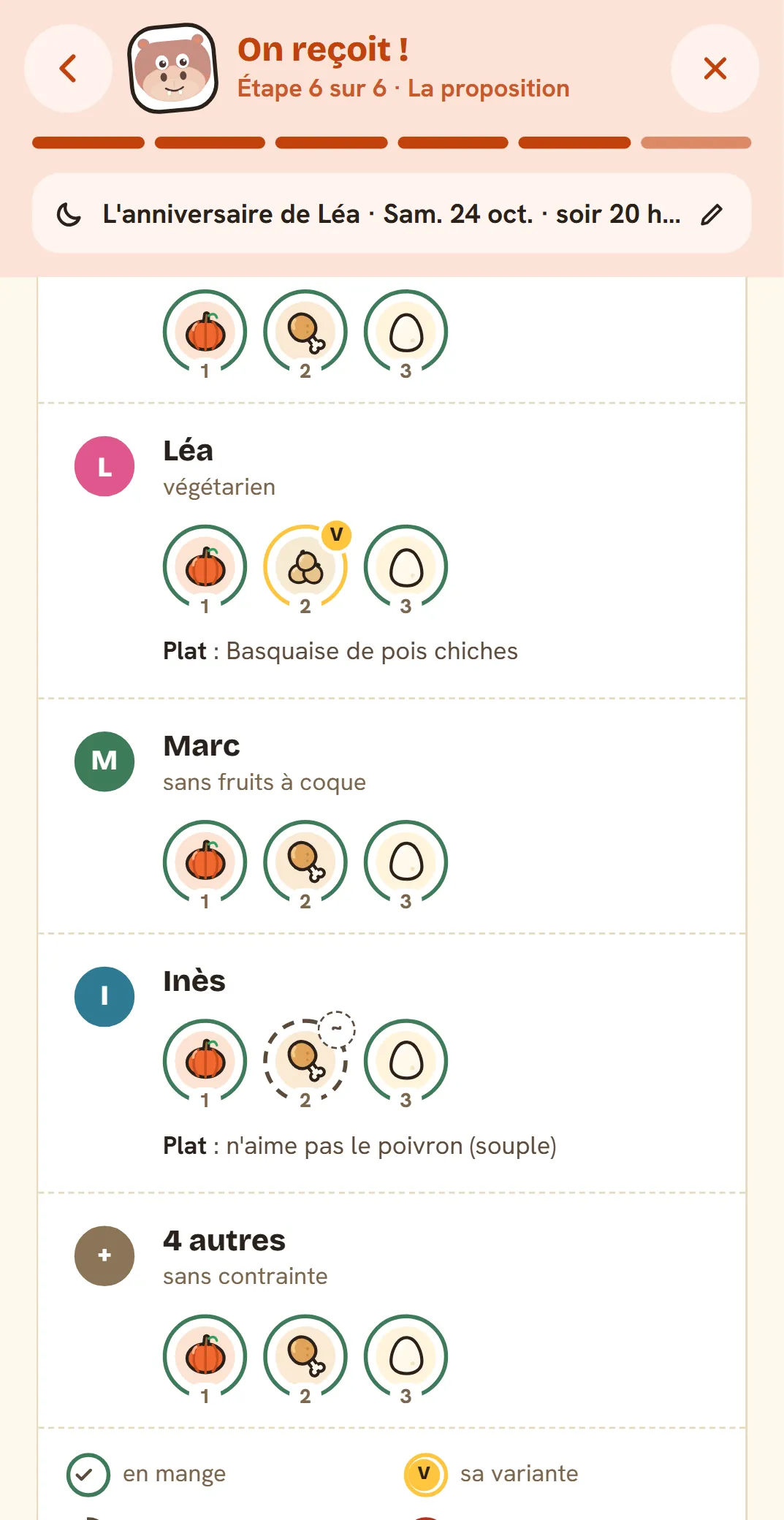
- Dislikes stay flexible. Popotam avoids them as much as it can, and “Who eats what” flags them: Inès dislikes bell pepper, but she can eat it.
Every dish is checked by Popotam against every allergy and every diet, as strictly as possible: a dish that probably contains one (a sauce, a pastry) is dropped and asked for again. The 14 allergens that must be declared in the EU are one tap away: gluten, milk, egg, peanut, tree nuts, sesame, soy, mustard, celery, fish, crustaceans, mollusks, lupin and sulphites.
If you pick a dish yourself that doesn't suit an allergic guest (a recipe from your cookbook, kept as is), Popotam shows it in red before adding it, and asks for a second tap: “Add to the meal plan anyway”.
Who eats what
Under the menu, one row per guest: their first name, their constraints in small print, then one plate per course, with a drawing of what they'll actually eat and the course number. A “V” marks the variant, a “~” something they dislike but can eat, a cross something they can't eat.
One dish, a full menu, nibbles or a festive meal
- One dish, the simplest: one dish for the table, and its variant if needed. If a dish was already planned that evening, you can even just keep it for more people.
- Starter, main, dessert: the proper meal. A dish you already planned can become the main, and Popotam plans the rest around it, in the right quantities.
- Dinner party nibbles: bites to graze on, shared by everyone.
- Brunch: savory and sweet, shared by everyone.
- Festive meal: appetizer, starter, main, cheese and dessert, the base for a birthday or holiday meal.
For Christmas Eve, our Christmas menus also give full menus with quantities for your table.
Tweak the menu to your taste
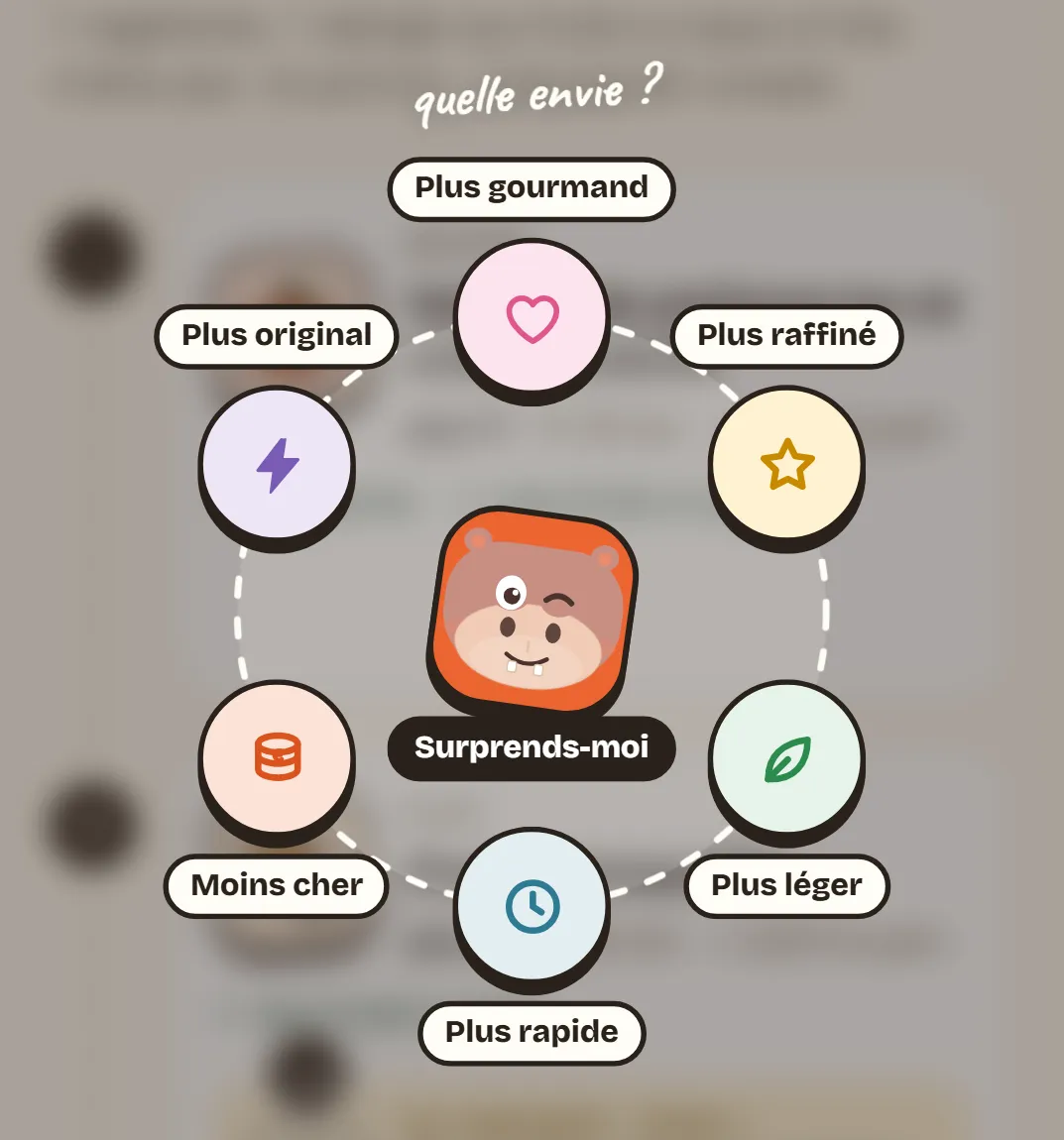
Not feeling a dish? Tap “Another idea”: six cravings pop open in a circle around the button, more indulgent, more refined, lighter, quicker, cheaper or more original, with Popotam in the middle for “Surprise me”. Only that dish is redone, the rest of the menu stays put, and the new dish is checked like the others.
- A dish from your cookbook: use a recipe from My cookbook for a course. It's kept as is, and “Who eats what” tells you who it doesn't suit.
- A separate serving: if the dish you keep doesn't suit someone, Popotam adds a version just for them.
- One dish is enough? On a dish with two versions, pick the one everyone will have: quantities follow, with no new request.
Groceries, the day before and the big day
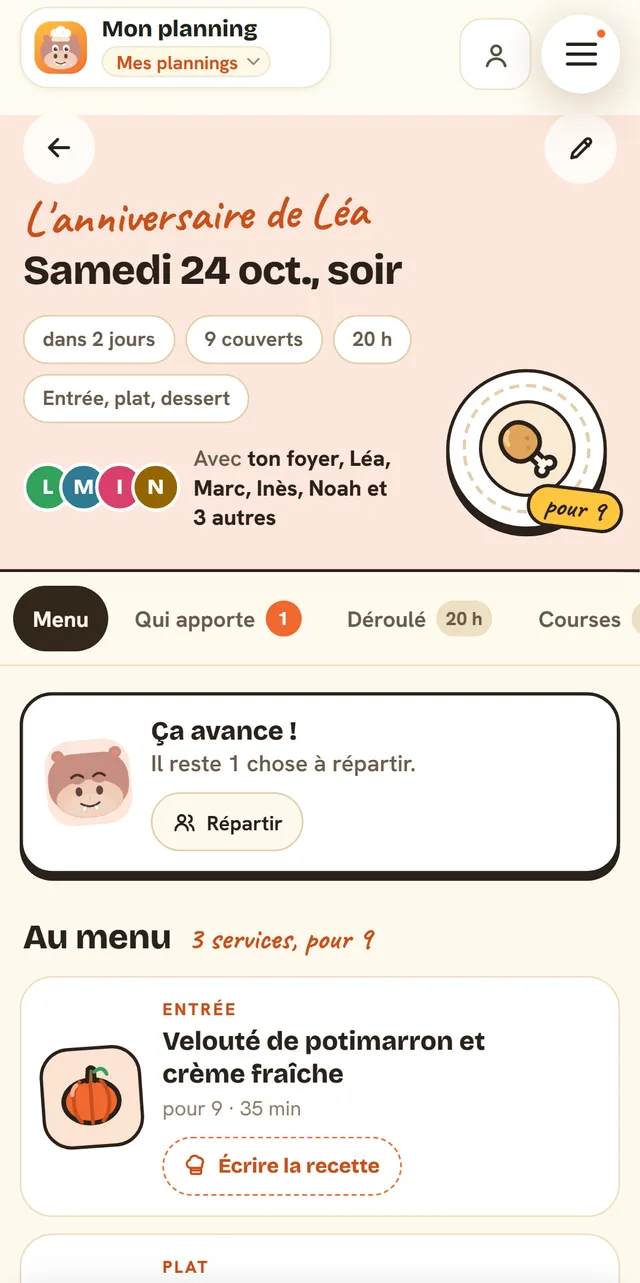
Once added, the meal has its own page in the app: the menu, who's coming, the groceries, and everything that helps on the day.
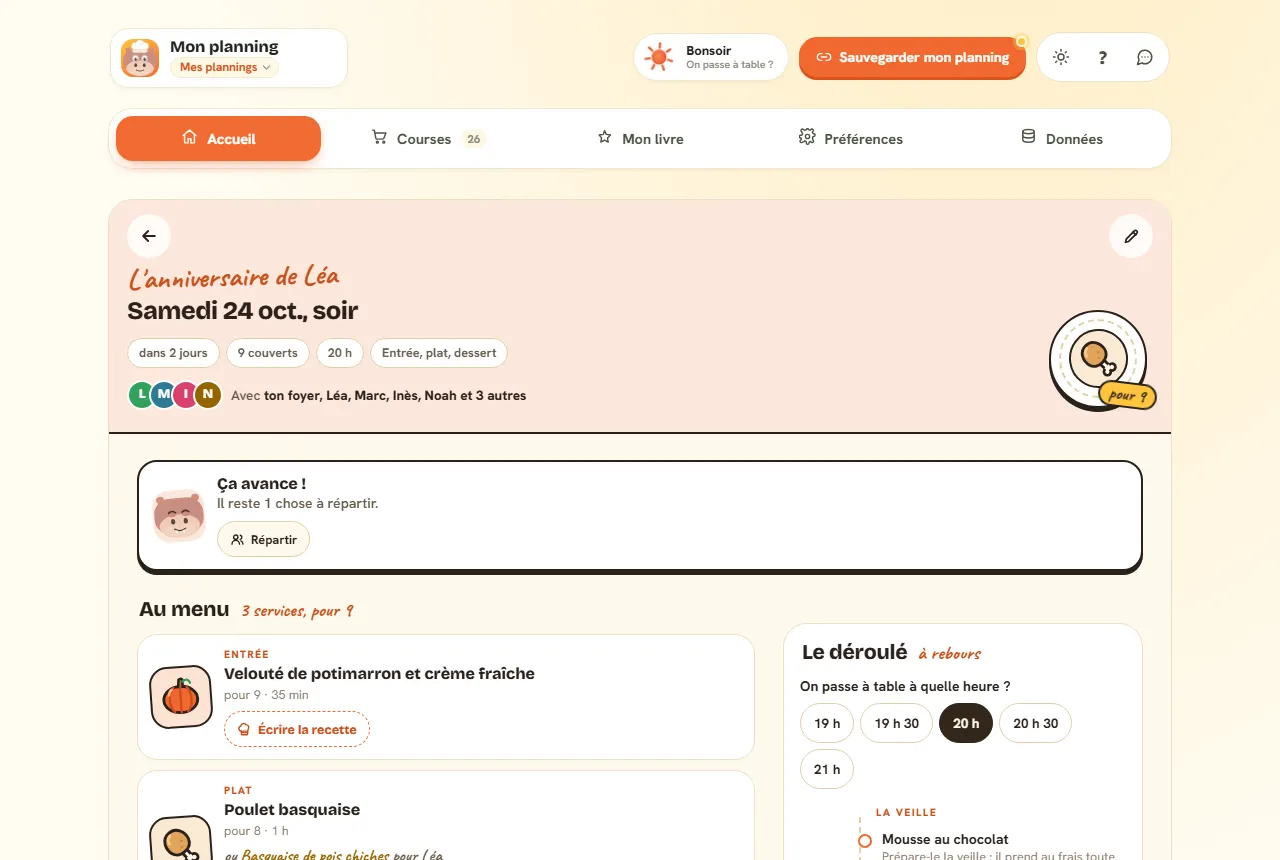
- Groceries: the meal's ingredients go into your grocery list, sorted by aisle like the rest (as soon as its week is planned), and a collapsible section lists them dish by dish.
- Who brings what: hand a dish, a bottle, the bread or some chairs over to a guest, and let them know with a ready-made message. What you hand off leaves your groceries.
- What time do we eat? Pick the time, and Popotam tells you when to start each dish, based on its recipe time with ten minutes to spare. Desserts that set in the fridge (mousse, tiramisu, panna cotta) and slow-cooked dishes (beef bourguignon, curry, tagine) are made the day before: on the day, the stews just get reheated.
- Each dish's recipe, written when you ask for it, respecting the whole table's allergies.
- Print or share the menu: a pretty card for the table, or a message for your guests, with no names and no allergies.
- The host sheet, just for you: who gets which plate, what to watch out for with each guest, and a reminder about traces.
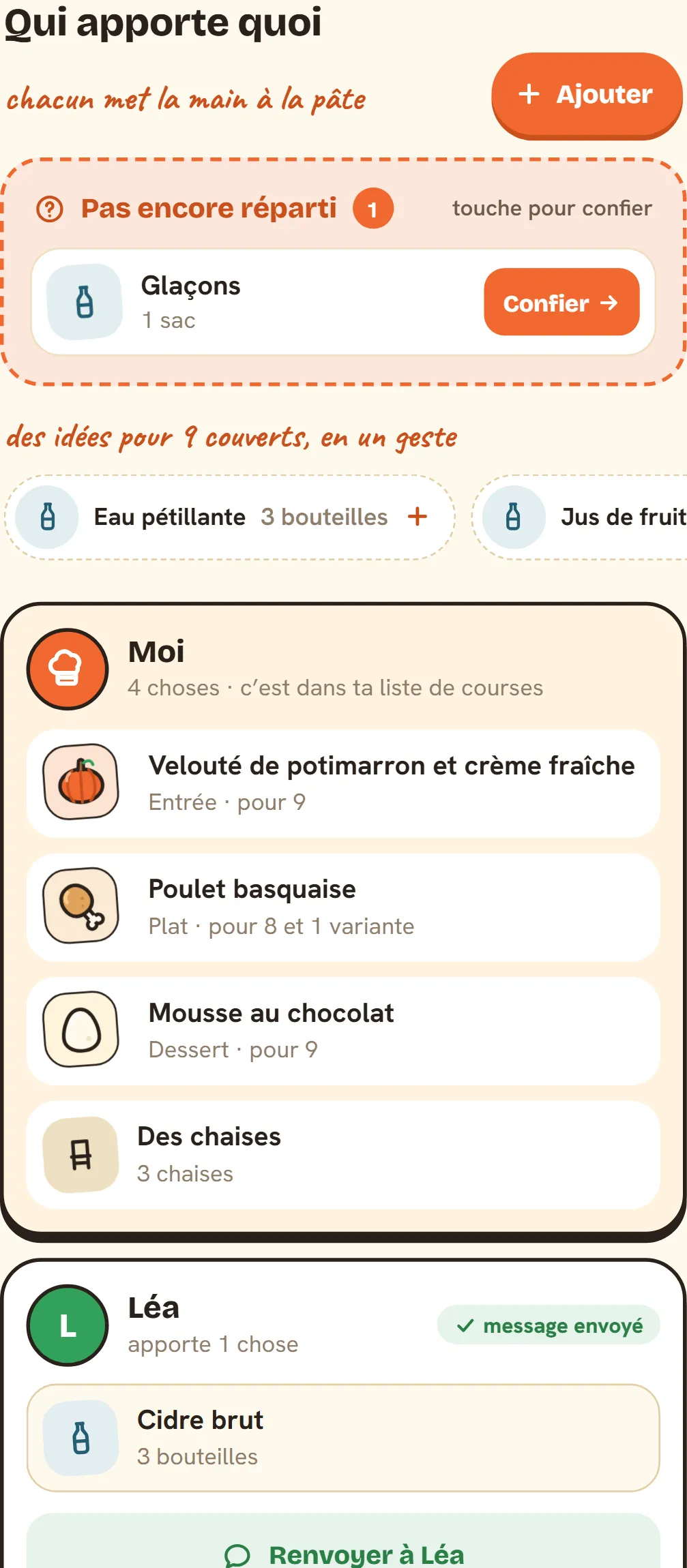
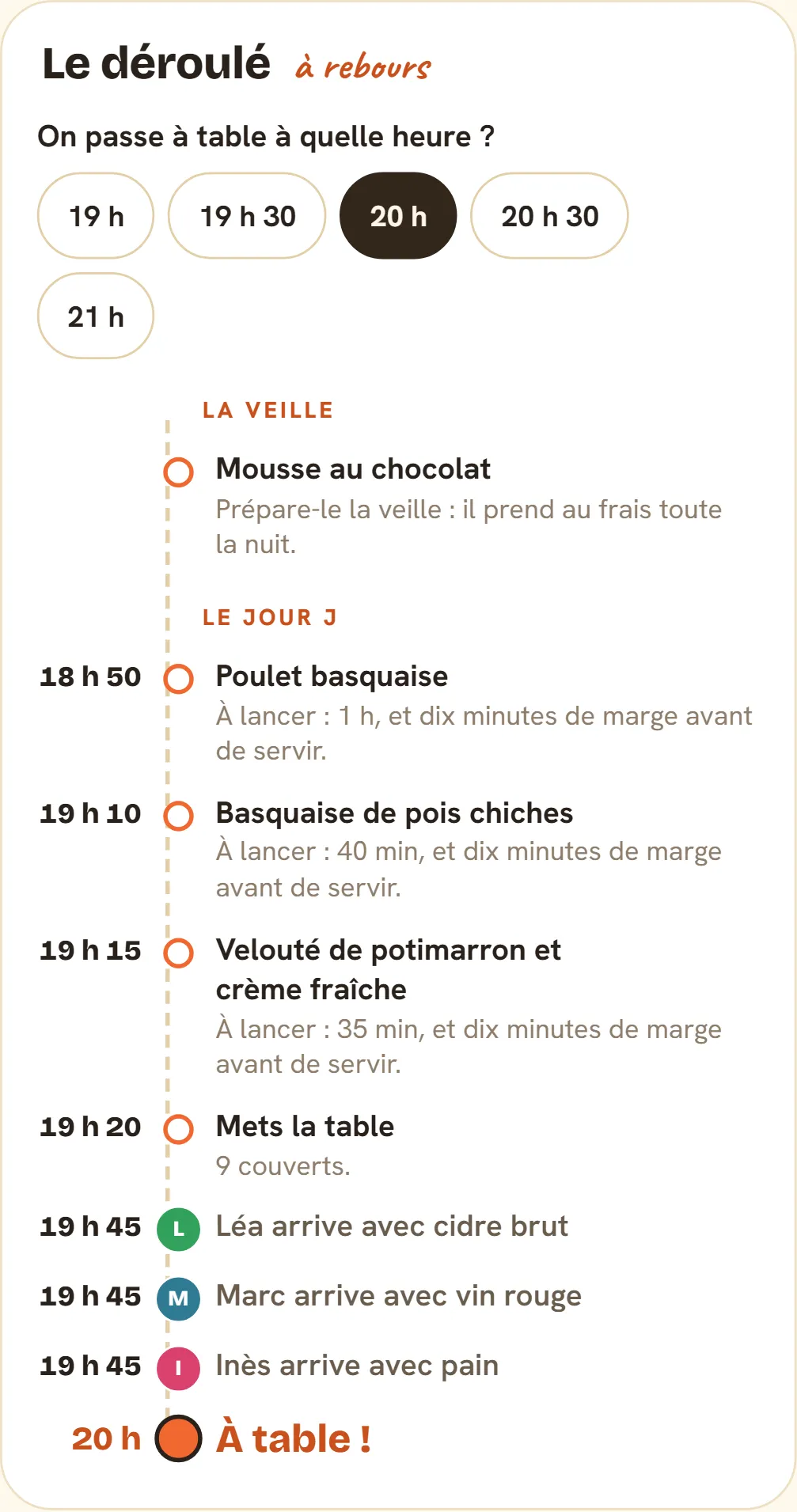
In your week
The guest meal is a “We're hosting!” card in your planner. In “Edit my week”, you see it in its slot, and you can open it, move it to another day (the dish in the target slot swaps with it), change who's coming, or cancel it.
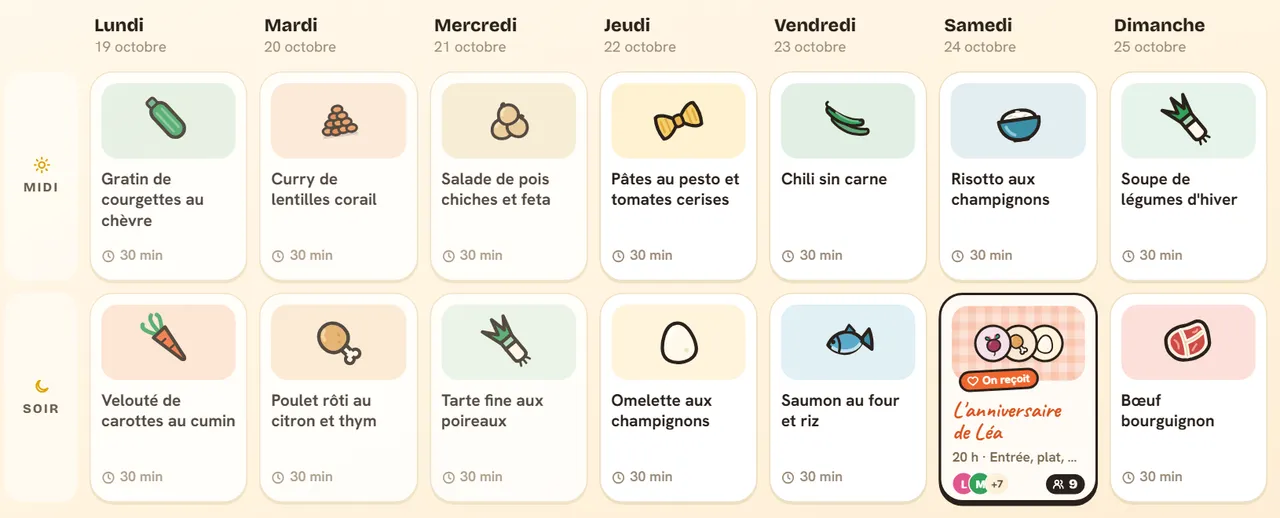
A guest meal stays put: neither the automatic planning of your week nor “Redo my week” touches it: it only goes away if you remove it. The dish that was planned for that slot comes back if you cancel.
Often host the same people?
At the end, save your table. It waits for you in My cookbook, under “My tables”: next time, your guests are already there with their constraints, in one tap. Popotam remembers what it served them and avoids serving them the same dish again. You can rename or delete a table whenever you like.
What stays with you, what goes to the AI
Your guests' allergies and diets are information about other people, and some of it is about their health. Popotam handles it accordingly:
- First names never go to the AI. They're optional and stay in your planner. The AI receives anonymous seats, with their diets, allergies and dislikes, plus the format, date, budget and time.
- The shared menu says nothing about anyone: no names, no allergies. Only your host sheet has them, and it's for you.
- You can delete a meal or a saved table whenever you like. A past meal deletes itself 60 days after its date.
- Your planner is shared through a link: whoever you give it to also sees your guest meals. Keep it for people you trust.
The details are in our privacy policy.
What Popotam doesn't do
- This isn't medical advice. Popotam checks every dish, but a recipe says nothing about traces, and a product's ingredients change from one brand to another. The labels and your guest have the last word.
- An AI sometimes gets it wrong: an optimistic cooking time, a dish you don't like. You can ask for another idea, use a dish from your cookbook, or adjust the quantities.
- It doesn't do the shopping for you: it sorts it into your list, by aisle, and you shop wherever you like.
- It doesn't send the invitations. You share the menu, not an invite.
Why it's free
“We're hosting!” is part of Popotam, free, with no account and no ads, and it runs on donations from the people who use it. The menu is planned by an AI (OpenAI's GPT-6 Luna, with Mistral AI as a backup), then checked by Popotam; “Who eats what”, the groceries and the timing are worked out without AI. What Popotam spends is published on the transparency page, read straight from its accounts.
Frequently asked questions
Start with what you feel like serving: one dish to share, a starter, main and dessert, dinner party nibbles, a brunch or a real festive meal. Then ask each guest about their allergies and diet. Popotam then plans the menu for the whole table: allergies apply to everyone, a vegetarian guest gets a variant close to everyone else's dish, and you leave with the groceries and when to start each dish.
Yes: “We're hosting!” is part of Popotam, free, with no account, no subscription and no ads. You pick the date, say who's coming with their diets and allergies, and Popotam plans the menu, adds it to your planner with its groceries, and tells you who eats what. Popotam installs on Android from Google Play, goes on an iPhone's home screen, and works in a computer's browser.
The simplest is often a variant: the same dish, with only the problem ingredient swapped, for example Basque-style chicken for the table and Basque-style chickpeas for them. That's what Popotam offers with “A variation for those who can’t”. You can also choose a fully vegetarian menu for everyone, or “Two dishes”, another main designed for them.
Note each guest's allergy: Popotam lists the 14 allergens that must be declared in the EU (gluten, milk, egg, peanut, tree nuts, sesame, soy, mustard, celery, fish, crustaceans, mollusks, lupin, sulphites), and you can type in others. An allergy applies to the whole table: one kitchen, dishes passed from hand to hand. Popotam checks every suggested dish against every allergy. Still check the labels: traces don't show up in a recipe.
With “One menu for everyone”, halal and pork-free apply to the whole table, like an allergy: nobody has a separate plate. If you prefer, choose a variant or “Two dishes”, and those who need it get their own version. Allergies and health diets always apply to the whole table.
Up to 24 people around the table, adults and children. A child counts as half a serving, and quantities and groceries follow. Your household can sit at the table with its everyday preferences, or not, if you're cooking for others.
For a simple meal, one generous dish to share is enough. For a real evening, starter, main and dessert. To graze standing up, dinner party nibbles; late morning on the weekend, a savory and sweet brunch; and for big occasions, a festive meal with appetizer, starter, main, cheese and dessert. Popotam plans each of these formats to fit your budget, your time and your cooking level.
The guest meal takes its place in your planner, on its date and at its time. If a dish was planned that day, you can keep it for more people (quantities and groceries follow) or replace it with a guest menu; it comes back if you cancel. A guest meal never disappears when you redo your week: it only goes away if you remove it.
Yes, up to a year ahead, even for a week that isn't planned yet: your week will be planned around it. Its groceries go into your list as soon as that week is planned.
In “Who brings what”, hand the dish over to the guest bringing it: it leaves your groceries and your timing, and Popotam drafts a little message to let them know.
No. First names are optional, they stay in your planner and never go to the AI, which only receives anonymous seats with their diets, allergies and dislikes. The menu you print or share has no names and no allergies. A past meal is deleted 60 days after its date, and you can delete a meal or a table whenever you like.
No account, no password, no subscription, no ads. “We're hosting!” is part of Popotam like everything else. Popotam runs on donations from the people who use it, and its spending details are public.