Your meals for the week or the month,
planned in minutes.
And the grocery list to match.
Popotam builds your menus in one click, or with your own AI if you'd rather, and sorts your groceries by aisle. No account, no headache.
Cook everything in one go? Popotam does your meal prep too

- Chickpeas
- Zucchini
- Parmesan
- Basil
Three steps, and you're done.
You stay in charge, the AI writes the rough draft, Popotam cleans it all up.
Tell it what you're craving
Your budget, what you love, what you don't eat. Popotam writes the prompt for you.
The AI builds the menu
Popotam handles it in one click, or you paste the prompt into Gemini, ChatGPT or Claude. Your call.
Meal plan + sorted list
Popotam turns the answer into a weekly meal plan and a grocery list sorted by aisle.
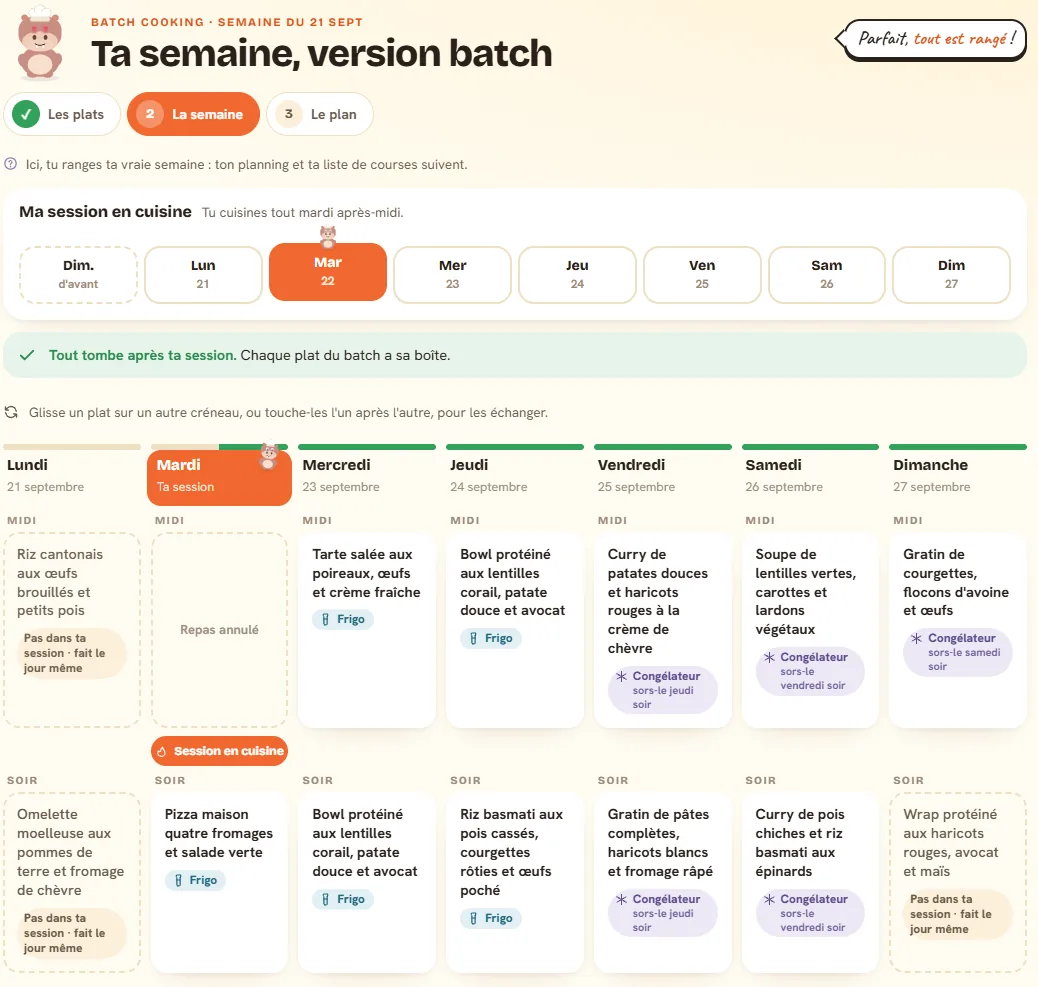
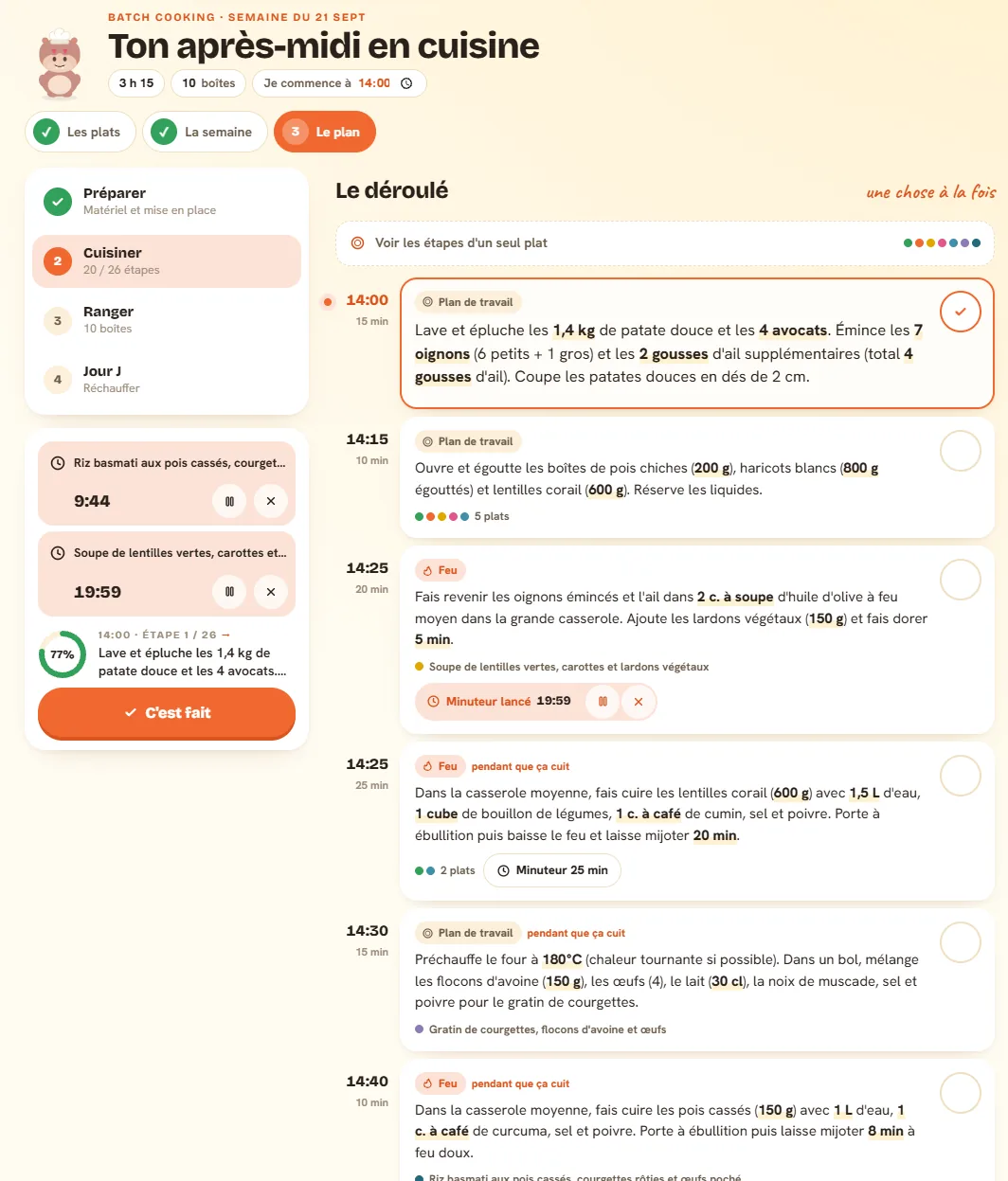
Your whole week, cooked in one afternoon.
You keep the dishes from your week that store well, Popotam writes the plan minute by minute: what to chop first, what simmers while the oven's on, and when everything goes into containers.
It sorts things for you
It spots what keeps in the fridge or freezer, and saves what's best eaten fresh for the day itself.
It knows your kitchen
Two burners or four, an oven or not, a Cookeo or a Thermomix: the plan never asks for more pots than you have burners.
You just follow along
Every cooking step gets its timer, every container its storage time. On the day, only the finishing touches are left.
It plans for you, not for everyone.
Two people with the same budget don't eat the same things. Popotam asks what really matters to you, once, and remembers it.
What you love
Favorite cuisines, mild or seriously spicy, safe bets or up for a surprise, ingredients you want more often. And the goal you're going for: balanced, high-protein, light or comfort food.
The time you've got
Twenty-five minutes on weeknights and more on weekends, quick dinners, a Sunday that takes its time. Popotam factors in your kitchen gear, what's already in your pantry, and the meals you actually want to plan.
What's non-negotiable
Vegetarian, halal, gluten-free, lactose-free, allergies, and the foods you just don't want to see. Popotam doesn't just ask the AI: it double-checks every dish, ingredient by ingredient, and tosses the ones that break the rule.
Pick a recipe off the line.
Tried-and-tested dishes, with quantities and price per serving, and in October some Halloween recipes: mummies, potions, spiderweb cakes. Flip the card!
- so goodCrispy tofu, broccoli and rice noodle skillet30 min≈ $3.25 per serving765 kcalAdd to meal planSee the recipe
- for the 31st!Pumpkin ricotta lasagna with a spiderweb80 minwith the kidsSee the recipeAll Halloween recipes
- for the 31st!Witch's magic potion, alcohol-free15 minalcohol-freeSee the recipeAll Halloween recipes
- budget-friendlyMushroom and potato omelet with green salad30 min≈ $2.13 per serving393 kcalAdd to meal planSee the recipe
- for the 31st!Halloween chocolate cake with a spiderweb55 minwith the kidsSee the recipeAll Halloween recipes
- quick & easyChickpea, tuna and avocado salad20 min≈ $4.76 per serving914 kcalAdd to meal planSee the recipe
- budget-friendlyPumpkin and chickpea soup with croutons35 min≈ $1.55 per serving493 kcalAdd to meal planSee the recipe
- so goodSweet potato, chicken breast and mushroom gratin50 min≈ $3.06 per serving541 kcalAdd to meal planSee the recipe
- so goodMushroom omelet with lamb's lettuce salad25 min≈ $2.58 per serving419 kcalAdd to meal planSee the recipe
- so goodBaked pasta with tuna and spinach30 min≈ $4.40 per serving856 kcalAdd to meal planSee the recipe
- budget-friendlyVegetable and egg bake55 min≈ $1.95 per serving427 kcalAdd to meal planSee the recipe
- so goodPasta with sardines, cherry tomatoes and basil25 min≈ $2.26 per serving494 kcalAdd to meal planSee the recipe
- so goodQuinoa salad with chickpeas and grilled chicken35 min≈ $4.68 per serving895 kcalAdd to meal planSee the recipe
- budget-friendlyLebanese tabbouleh and homemade falafel40 min≈ $1.62 per serving590 kcalAdd to meal planSee the recipe
What if you had nothing left to do?
Popotam can plan your next week on its own, on the day you pick. You open the app, and it's already done.
You pick your day
Thursday before grocery day, Sunday night, whatever works for you. That's the day Popotam gets to work.
It plans, you chill
Fourteen meals, your budget, your restrictions, never repeating what you just ate. Plus the grocery list to match.
It never touches your current week
Only next week gets written. Your checked-off meals and your current list stay exactly how you left them.
And you can tweak it ahead of time
It opens in a tap, before the week has even started: swap a dish you're not feeling, cancel a dinner you'll miss, get a recipe written. By Monday, everything's ready to go.
Every Thursday, Popotam plans the following week. Turn it off in one click, whenever you want.
Free for real, and we cook in the open.
No trial period, no surprises. A free service is bound to raise eyebrows, so everything's on the table, with the real numbers, updated automatically.
- You can use your own AIGemini, ChatGPT or Claude, from your free account: it costs nobody a thing.
- Or let Popotam do itOne generation costs it less than one cent: way too little to bill you for anything.
- No ads, nothing to sellNo banners, no paid version, and no store pays to get mentioned.
The server, the AI and the domain name still cost a bit every month. Anyone who wants to fills up the pot, and we all watch the bills get stamped together.
A donation doesn't unlock any feature or lift any limit (makes sense, there aren't any). Popotam stays free and complete, with or without. Promise!
And what leaves here? Your meal plan lives behind a private link, no account or password, and the AI (OpenAI's GPT-6 Luna for your weeks, Mistral AI for the rest) only gets your preferences, never who you are. It's all spelled out here.
This week, across 1,984 households.
What households actually plan with Popotam, measured every Monday: totals only, never a single household.
49% of meals are vegetarian
Even though only 4% of households call themselves vegetarian.
≈ $2.20 per meal, per person
Estimated cost, for a target budget of $28 a week.
25 min for a lunch
And 30 min for a dinner, median, prep and cooking included.
The full barometer for the week, with the dishes people keep, the star ingredients, calories and how things change week after week.
And compared to Jow or HelloFresh?
There's no single tool that's right for everyone. Popotam doesn't deliver anything, doesn't sell anything and doesn't order your groceries: on those fronts, others do better. Might as well tell you right here.
Popotam or Jow
Jow fills your cart at six partner retailers. Popotam lets you shop wherever you want, farmers' market included.
Popotam or HelloFresh
A meal kit delivers pre-portioned ingredients, for a subscription. Popotam organizes the ones you buy, for free.
Popotam or Quitoque
A delivered meal kit from €7.74 a plate, or a flexible meal plan that costs nothing.
The full comparison of the eight tools, with the detailed table and prices checked at the source, and our guide which free app to use for weekly menus.
Christmas Eve dinner coming up? Grab a ready-made Christmas menu, with the grocery list and the game plan.
The questions we get asked.
The ones that come up most, with real answers. If yours isn't here, drop us a line.
Is it really free? What's the catch?
Do I need to create an account?
Do I need to install an app?
Does Popotam give you recipes, or just dish names?
What gets sent to the AI?
I'm vegetarian, halal or gluten-free: can I trust it?
Can I change the menu Popotam suggests?
For how many people?
How long does it take to get your first meal plan?
Do I have to give my email address?
Can I plan more than a week ahead?
Can Popotam plan my week on its own?
Can I use my own AI instead of Popotam's?
What's the difference between Popotam and Jow or HelloFresh?
Does Popotam help with meal prep?
Does Popotam take my budget into account?
Does Popotam show the calories of meals?
Can I find a recipe with what's in my fridge?
Which store does it work with?
Can several people share a meal plan, as a couple or roommates?
Can I manage several meal plans on the same phone?
What happens if I lose the link to my meal plan?
Is my data hosted in France?
Create your meal plan, it's free.
A few minutes for organized meals and a ready-to-go grocery list. No account, no commitment.
Create my meal plan