The free meal prep app: your week cooked in one afternoon.
The app makes your plan in about twenty seconds. Free, no account needed.
- The dishes that keep
- Every step timed
- Where each container goes
Cook once, eat well all week. Popotam is a free meal prep app, no account and no subscription: it starts from your meal plan and turns it into a full plan, the dishes that keep, your session day, every step in order with its timers, and where each container goes. Storage follows official food safety guidelines.

So what is meal prep?
Meal prep means cooking several days' worth of meals in a single session. One afternoon, often Sunday, to make eight to ten dishes, split them into containers and stash them in the fridge or freezer. On weeknights, all that's left is to reheat, or finish a dish in a few minutes.
What you gain isn't just time. The “what's for dinner?” question disappears, you shop once, and you order less takeout for lack of ideas. The scary part is the organizing: what to cook first, what will last until Thursday, where each container goes. That's exactly the part Popotam takes care of.
What the app does
A meal prep app should do the annoying part for you: the organizing. Here's what Popotam does, from the meal plan to the last container put away.
- Your week of meals, built around your tastes, your time and your budget, or written by you, with the grocery list sorted by aisle.
- The dishes that keep, checked by default, and the ones that are better made fresh, flagged with the reason.
- Your kitchen: the number of burners, the oven (or no oven), your multicooker (Cookeo, Thermomix) and how much time you've got.
- A timed plan: the steps for each dish, then the order worked out for one pair of hands, with cooking that overlaps.
- Timers that start with one tap and stay visible when you switch to another screen in the app.
- Storage for every container, fridge or freezer, worked out from ANSES guidelines, with the evening to take a frozen dish out.
- Ready-made plans, to drop into your week in one move.
- A shared meal plan with your household, updated live.
That's the difference with a meal prep book or program: they give you someone else's menus. The app starts from your meals, your servings and your kitchen, and redoes the plan as soon as your week changes.
Your session in three steps
It all starts from your week of meals, generated by Popotam or written by you. The “Meal prep” button is at the top of your meal plan.
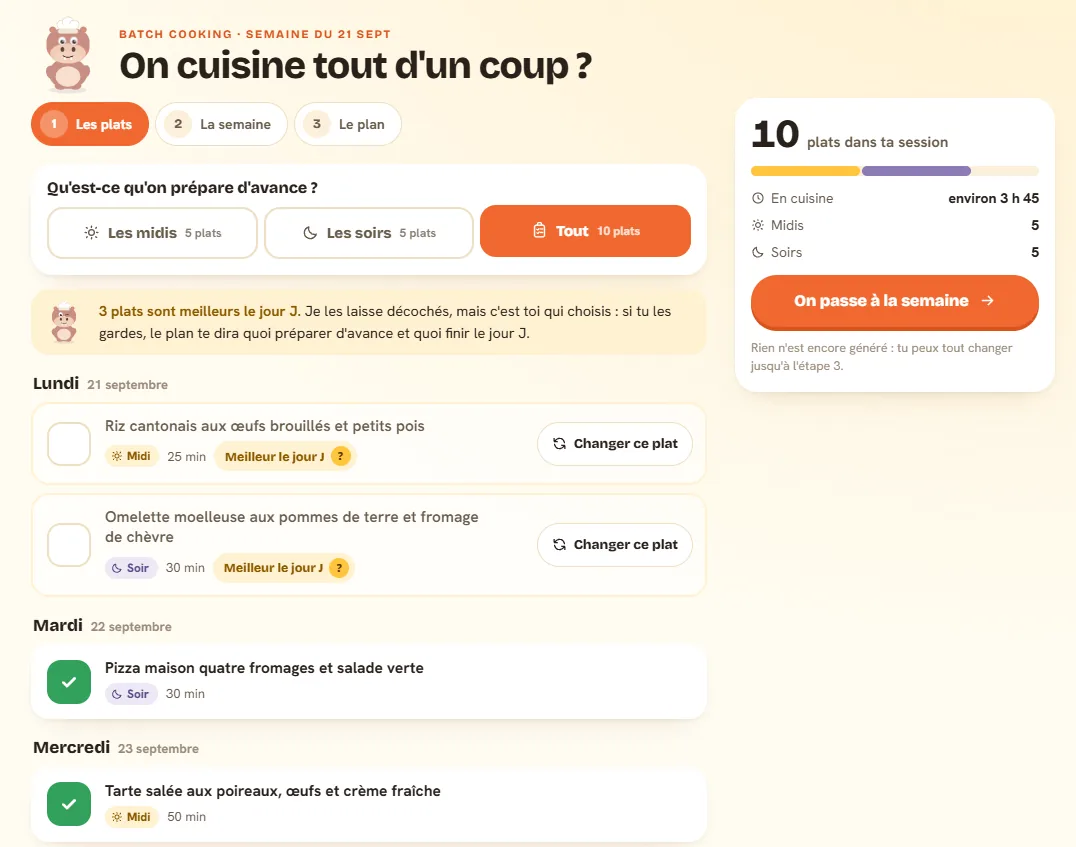
1. Pick what you make ahead
Popotam checks the dishes that keep well by default, lunches, dinners or both. The ones that are better made fresh get a “Best on the day” label, with the exact reason: an omelet turns rubbery once reheated, an avocado browns in a few hours. Nothing is forced, and you can swap a dish for one of the three suggestions Popotam gives you.
2. Build your week around your session
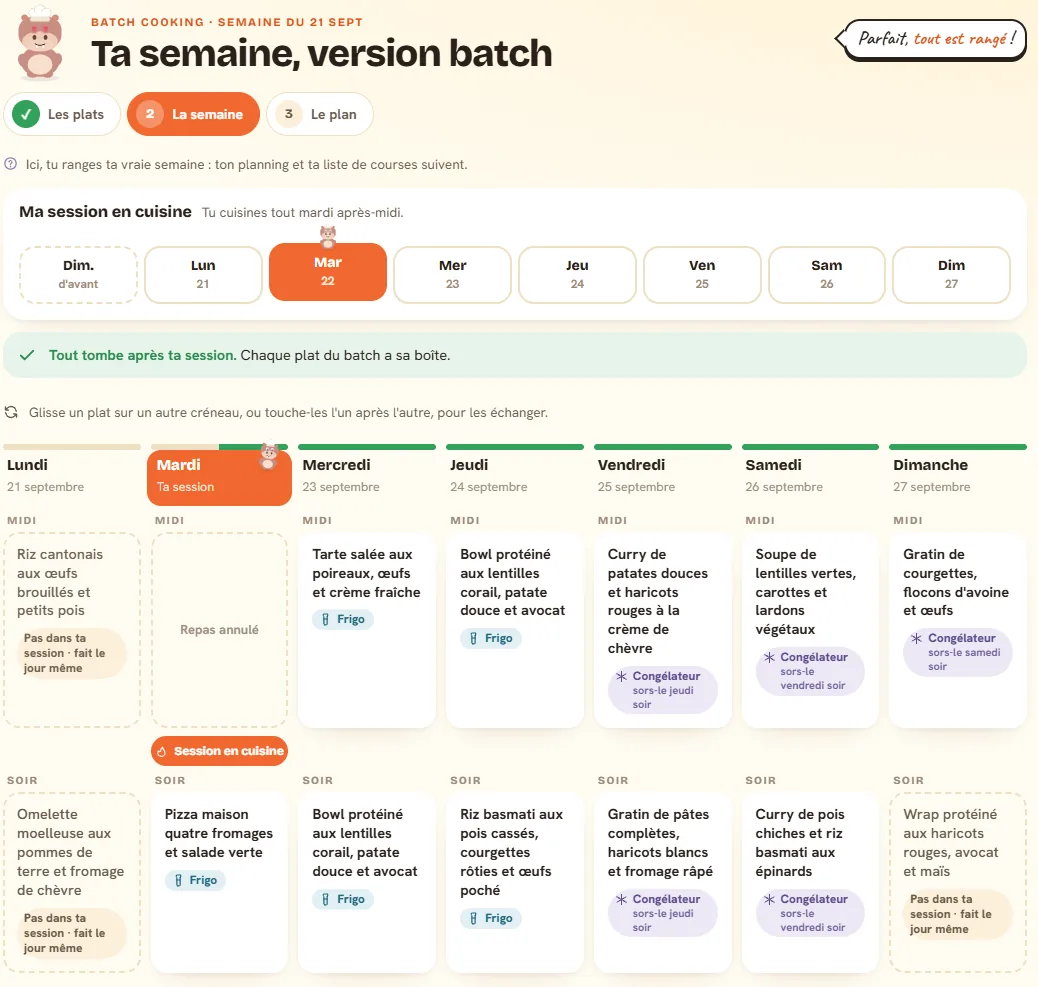
You pick your cooking day, from the Sunday before to the Sunday of the week, and tell it about your kitchen: burners, oven, multicooker, and how much time you've got. Every dish instantly gets its label: fridge if you eat it within two days, freezer after that, with the evening to take it out. You swap two dishes in one move, and your actual meal plan and your grocery list follow along.
3. Follow your plan, step by step
Popotam writes out your afternoon in the kitchen: the gear to get out, the veggies to wash and chop, grouped for every dish, then each step with its time, how long it takes and its quantities in bold. Cooking overlaps, a timer starts with one tap, and on your phone the screen can stay on while your hands are covered in flour.
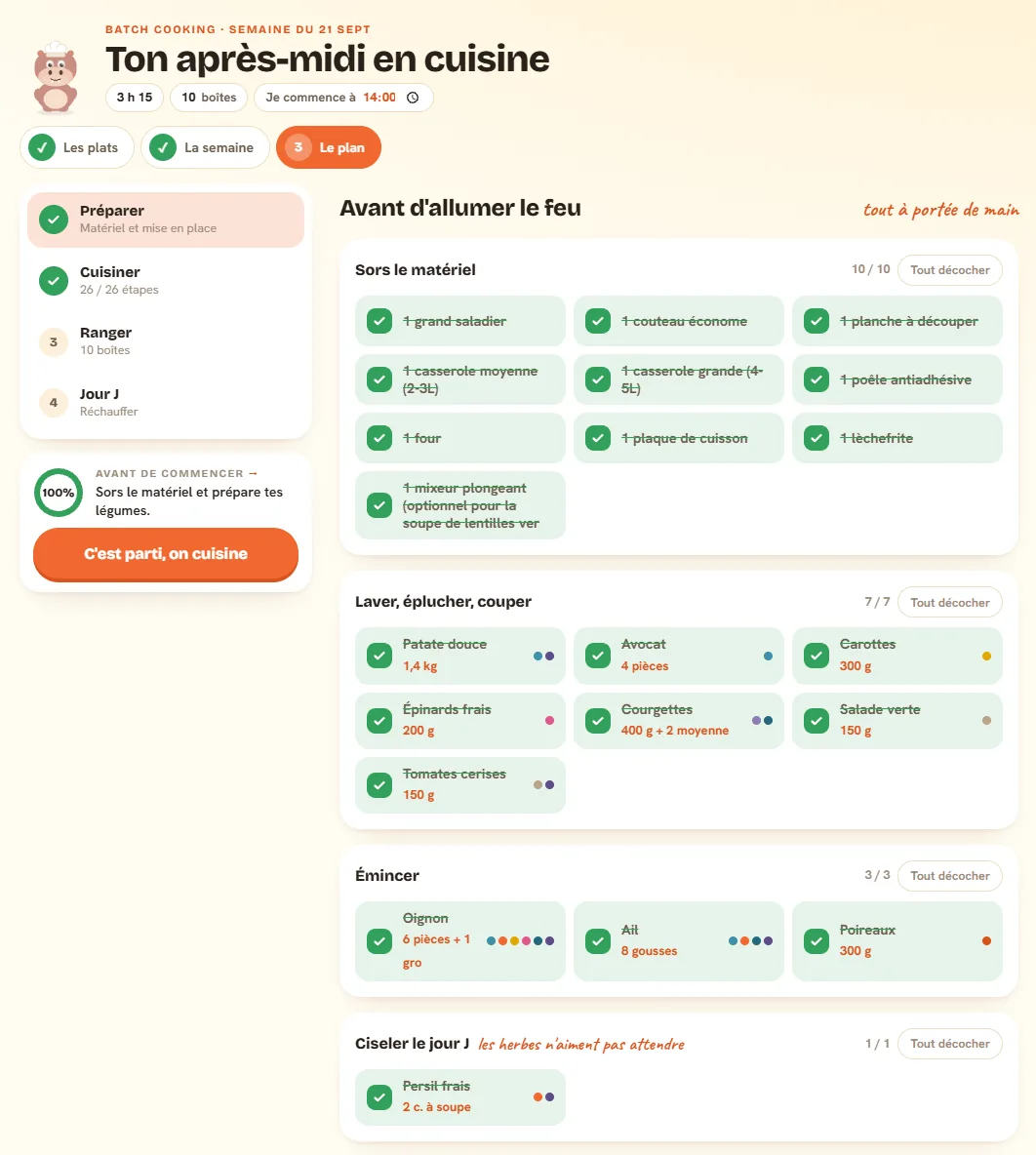
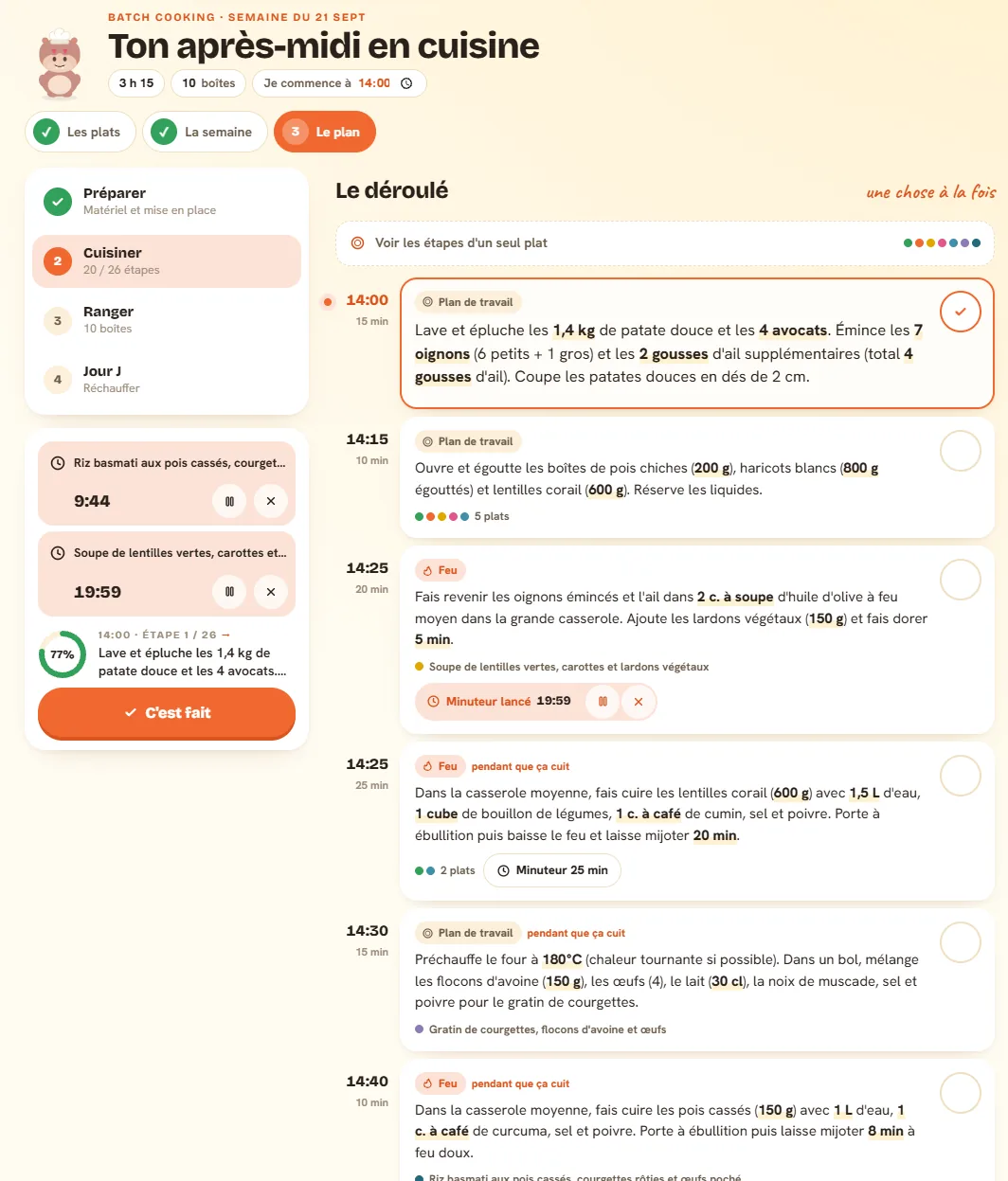
At the end, you know where each container goes, in the order you'll eat them, and how to reheat each dish on the day.
How long it keeps
This is the question that matters most, and plenty of sites answer it too generously. Popotam always goes with the most cautious value from official sources, and Popotam calculates it itself: it's never asked of the AI.
| What you're making | In the fridge | Up next |
|---|---|---|
| Cooked dish (stew, gratin, soup, curry…) | 2 days | Freezer, thawed in the fridge the night before |
| Fish dish | 1 day | Freezer, or cooked on the day |
| Rice, pasta, couscous as a side | D-Day | Cooked the same day, in ten minutes |
| Any dish, before it goes cold | 2 h max | At room temperature, then fridge or freezer |
Where these numbers come from: ANSES (the French food safety agency) recommends eating cooked dishes within three days and not leaving them more than two hours at room temperature; Health Canada and the USDA give three to four days for cooked leftovers. Popotam rounds down. Fish at one day is stricter than the sources: it's the food we're most careful with.
To make it really last, two moves: split it into shallow containers, which cool down fast, and put them away within two hours. A frozen dish thaws in the fridge, the night before, never on the counter. Popotam reminds you that evening on your meal plan's home screen.
The full breakdown, dish by dish, day by day and in the freezer, is in our guide how long meal prep dishes keep.
Dishes that work, and the ones that don't
The meal prep champions are the dishes that simmer: curries, chilis, dals, soups, bolognese, ratatouille, tagines, gratins, lasagna, meatballs. They handle the cold, and lots of them even get better after a day. They freeze really well too, and Popotam happily pushes them toward the end of the week.
On the flip side, some dishes are meant to be eaten right after they're made:
- Omelets and soft-boiled, poached or scrambled eggs: reheated, they get tough.
- Fried and breaded food: the crunch doesn't survive the fridge.
- Salads and raw veggies: they get soggy as soon as they sit. Lentil, chickpea or quinoa salads, though, hold up really well.
- Avocado: once cut, it browns in a few hours.
- Sandwiches, wraps and croque-monsieur: the bread gets soggy. Prep the filling ahead, assemble on the day.
- Raw fish (tartare, poke, sushi): it's on the day or nothing.
You can still keep them in your session: the plan will tell you what to prep ahead (the sauce, the filling, the chopped veggies) and what to finish on the day.
The order that saves you time
A good meal prep session is about the order of things, not speed. That's what Popotam's plan organizes for you:
Get the gear out and do the prep
All the veggies for all the dishes in one go: wash, peel, slice. One onion for six dishes only gets chopped once.
Start what cooks longest first
While the curry simmers and the gratin is in the oven, you move on to the rest. The plan works with your kitchen: one pair of hands, the number of burners you have (even two in a studio) and your oven, or no oven at all.
Cool down and pack up
All at once, in shallow containers, then each one goes in the fridge or the freezer depending on the day you'll eat it.
A real session, by the numbers
The screenshots on this page come from a real week prepped with Popotam, with a Tuesday afternoon session:
Monday's meals came before the session and were cooked on the spot. The Sunday night wraps were left for the day, and everything else was ready through Sunday lunch, between the fridge and the freezer.
To follow a full session, step by step and down to the minute, check out our meal prep session example. For a menu designed for meal prep, with its grocery list, there's our weekly meal prep menu. And for ready-to-go sessions you can follow as is: our meal prep plans (vegetarian, budget, family, no oven, in 1 h 30).
On your phone or your computer
Meal prep happens with your hands in the kitchen: the app is designed first for a phone propped up on the counter, and the screen can stay on during your session.
- Android: Popotam installs from Google Play, for free.
- iPhone: from Safari, add Popotam to your home screen, and it opens like an app.
- Computer: it works in the browser, nothing to install.
It's the same meal plan everywhere: you plan your week on the computer, you follow your session on your phone, and the people you eat with see the changes live.
What Popotam doesn't do
- It doesn't cook for you, and AI sometimes gets things wrong: an optimistic time, a step to tweak. You can add your own steps, and redo your plan whenever you want.
- It doesn't know your fridge. The storage times assume the cold chain was respected and a fridge at 4 °C (39 °F) or colder.
- It's not medical advice. Pregnant women, young kids and vulnerable people have stricter guidelines: when in doubt, the most cautious rule is the right one.
- It doesn't ring when your phone is locked. Timers show up, and vibrate on Android, as long as Popotam is open on screen.
Why it's free
Meal prep is part of Popotam, free, no account and no ads, and Popotam runs on donations from the people who use it. Storage is calculated on your phone and costs nothing, the session order is calculated by Popotam; only each dish's steps are written by an AI (Mistral AI, a French company), for a fraction of a cent per plan. What Popotam spends is published on the transparency page, read straight from its accounts.
Frequently asked questions
Yes: Popotam is a completely free meal prep app, no account, no subscription and no ads. It starts from your weekly meal plan, picks the dishes that keep, writes your timed plan for your kitchen and tells you where each container goes. You can install it on Android from Google Play, add it to an iPhone home screen, and it also works in a computer's browser.
Meal prep (or batch cooking) means cooking several days' worth of meals in one session, often on the weekend. You make everything at once, pack it into containers, and on weeknights all that's left is to reheat or finish a dish in a few minutes. In French it's called “batch cooking”, from the English word “batch”.
It depends on what you're after. Books, programs and meal kits give you ready-made menus, built for someone else. An app like Popotam starts from your own meals, your tastes, your budget and your kitchen, and redoes the plan as soon as your week changes. Our comparison of meal planning tools can help you pick what fits your needs.
On Android, yes: Popotam is on Google Play. On iPhone, it's not on the App Store: you add it to your home screen from Safari, and it opens like an app. On a computer, it works in the browser. It's the same meal plan everywhere, and your household sees it change live.
Nope. No account, no password, no email address required. Your meal plan lives behind a private link that you can share with the people you eat with.
Two days max for a cooked dish, and just one for fish, counted from your session. That's the rule Popotam follows, based on ANSES (the French food safety agency), which recommends eating cooked dishes within three days. Anything you'll eat later goes in the freezer, then thaws in the fridge the night before.
The most common is Sunday afternoon, to cover the week ahead. But you can pick any day: with a Tuesday session, Monday's meals and Tuesday lunch get cooked on the spot, and your prep covers the rest. Popotam recalculates storage for every dish as soon as you change the day.
Plan on two to four hours for eight to ten dishes, depending on the recipes and your kitchen. Popotam estimates the time before writing the plan, and you can tell it how much time you've got (1 h 30, 2 h, 3 h, 4 h): the plan tries to fit, and if it runs over, it tells you which dish to drop. Cooking overlaps: while one dish simmers, you prep another.
The ones you eat right after they're made: omelets, soft-boiled or scrambled eggs, fried and breaded food, dressed salads and raw veggies, cut avocado, assembled sandwiches and wraps, raw fish. Popotam spots them and tells you why, without pulling them automatically: you can keep them, and the plan will tell you what to prep ahead and what to finish on the day.
It's not recommended. Cooked rice, pasta and couscous are the foods at risk for Bacillus cereus, whose toxin survives reheating (ANSES). So Popotam preps the rest of the dish during your session and saves cooking the starch for the day you eat it: ten minutes in boiling water.
Nope. A big pot, a skillet, a baking dish and enough airtight containers are plenty to get started. When you make your plan, you say how many burners you have, whether you have an oven, and your multicooker if you have one (Cookeo, Thermomix): the plan sticks to that, even with two burners and no oven in a studio.
Yes, and that's on purpose. When you swap two dishes on the week board, your actual meal plan and your grocery list follow. You can also replace a dish that doesn't keep with one of Popotam's three suggestions.
The names of the dishes you picked, their times and ingredients, the number of servings, your kitchen (burners, oven, multicooker), your cooking level, your dietary restrictions and the foods you excluded. Never your email address or your meal plan's ID. The AI only writes each dish's steps; the session order and storage are calculated by Popotam, and storage is never asked of the AI.
Yes, totally: no subscription, no premium version, no ads. Meal prep is part of Popotam like everything else. Each plan costs Popotam a fraction of a cent in AI, and Popotam runs on donations from the people who use it: that's why you can redo your plan as often as you want, and the spending details are public.